主要介绍一下常用的类或者函数接口
thread
std::thread 线程类,用于启动一个线程,不支持拷贝构造,不支持赋值拷贝,支持移动构造,移动赋值
std::this_thread 命名空间
- get_id Get thread id (function )
- yield Yield to other threads (function )
- sleep_until Sleep until time point (function )
- sleep_for Sleep for time span (function )
mutex
std::mutex 封装互斥锁的类,可调用lock、unlock进行加锁解锁
std::recursive_mutex 支持一个线程多次加锁(递归场景)
std::timed_mutex 额外提供try_lock_for和try_lock_untile接口,这两个接口跟try_lock类似,只是他不会马上返回,而是直接进入阻塞,直到时间条件到了或者解锁了就会唤醒试图获取锁资源
std::lock_guard C++11提供的⽀持RAII⽅式管理互斥锁资源的类,在构造时加锁,析构时解锁。另外可以在构造时传入std::adopt_lock管理已经加锁的mutex对象
1
2
3
4
5
6
7
| std::mutex mtx;
{
mtx.lock();
std::lock_guard<std::mutex> lck (mtx, std::adopt_lock)
}
|
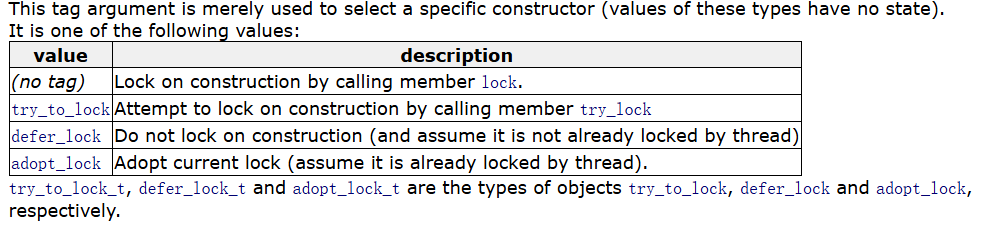
std::unique_lock lock_guard的进阶版,提供更多的接口;unique_lock在构造的时候传不同的tag,⽤以支持在构造的时候不同的方式处理锁对象
try_to_lock:该对象管理m,并通过调用将其锁定(不阻塞)。锁定失败无返回值,可通过对象本身重载的operator bool判断。m.try_lock()
defer_lock:管理传入的互斥锁对象 ,但不对其进行锁定。且传入的互斥锁当前未被构造线程锁定。
adopt_lock:管理传入的m,并且当前已经被构造线程锁定
**unique_lock **还支持构造时传入 const chrono::duration<Rep,Period>& rel_time或者const chrono::time_point<Clock,Duration>& abs_time支持锁定持续时间或者锁定直至时间点
主要是为了解决什么问题?
std::lock_guard 是极简 RAII 锁:
- 构造 = 加锁
- 析构 = 解锁
- 无法延迟、无法尝试、无法接管、无法手动 unlock
std::unique_lock + 标签,解决了 lock_guard 的三大硬伤:
- 无法延迟加锁 → 用
defer_lock
- 无法非阻塞尝试加锁 → 用
try_to_lock
- 无法接管已手动加的锁 → 用
adopt_lock
同时,这些标签是 std::condition_variable 等待、std::lock 多锁死锁避免 的基础前提。
条件变量要能自动解锁、自动重新加锁 → 必须用 unique_lock + 标签
同时锁多个锁、避免死锁 → 必须用 unique_lock + defer_lock
lock
函数模板,可以⽀持对多个锁对象同时锁定,如果其中一个锁对象没有锁住,lock函数会把已经锁定的对象解锁而进入阻塞,直到锁定所有的所有的对象。
try_lock
也是⼀个函数模板,尝试对多个锁对象进⾏同时尝试锁定,如果全部锁对象都锁定了,返回-1,如果某⼀个锁对象尝试锁定失败,把已经锁定成功的锁对象解锁,返回未锁定对象的索引
**call_once:**多线程执行时,让第一个线程执行Fn一次,其他线程不再执行Fn。
我们可以注意到,几乎所有的锁对象,都不支持拷贝构造,赋值重载,只会支持移动构造或者移动赋值
atomic
具体在另一篇博客中可以找到atomic和无锁设计(CAS)相关内容
condition_variable
std::condition_variable 是 C++11 提供的线程同步机制,通常配合 mutex 和 unique_lock 使用,用于让线程等待某个共享状态发生变化,避免忙轮询。
当线程调用 wait 时,它会原子地释放 mutex 并进入阻塞状态;被 notify_one 或 notify_all 唤醒后,会重新竞争 mutex,拿到锁以后 wait 才真正返回。
因为条件变量存在虚假唤醒,所以通常应该使用带 predicate 的 wait,或者使用 while 循环重新检查条件。
notify_one 用于唤醒一个等待线程,notify_all 则唤醒所有等待线程。
两个线程交替输出奇数偶数
1
2
3
4
5
6
7
8
9
10
11
12
13
14
15
16
17
18
19
20
21
22
23
24
25
26
27
28
29
30
31
32
33
34
35
36
37
38
39
40
41
42
43
44
45
46
47
48
49
50
51
52
53
54
55
56
57
58
59
60
61
62
63
64
65
66
67
68
69
70
| #include <iostream>
#include <thread>
#include <mutex>
#include <condition_variable>
std::mutex mtx;
std::condition_variable cv;
int num = 1;
bool odd_turn = true;
void print_odd() {
while (num <= 20) {
std::unique_lock<std::mutex> lock(mtx);
cv.wait(lock, [](){ return odd_turn; });
if (num <= 20) std::cout << "奇: " << num++ << std::endl;
odd_turn = false;
cv.notify_one();
}
}
void print_even() {
while (num <= 20) {
std::unique_lock<std::mutex> lock(mtx);
cv.wait(lock, [](){ return !odd_turn; });
if (num <= 20) std::cout << "偶: " << num++ << std::endl;
odd_turn = true;
cv.notify_one();
}
}
int main() {
std::thread t1(print_odd), t2(print_even);
t1.join();
t2.join();
return 0;
}
|
future和async
std::future 是 C++11 提供的异步结果获取机制,它本身不负责执行任务,而是关联一个 shared state,用于获取异步任务最终产生的返回值或者异常。
std::async 是一种高级异步任务接口,可以直接提交一个可调用对象,并返回对应的 future。调用 future::get() 时,如果任务没有完成,当前线程会阻塞,任务完成后返回结果;如果异步任务抛出了异常,异常会保存在 shared state 中,并在 get() 时重新抛出。
std::async 有 std::launch::async 和 std::launch::deferred 两种启动策略。前者要求异步执行,后者直到调用 get 或 wait 时才真正执行。默认策略允许实现自行选择。
future 通常只能调用一次 get(),如果需要多个线程读取同一结果,可以使用 shared_future。
以下由ChatGPT生成,可做参考
1. std::future
std::future<T> 用于接收异步任务未来返回的结果。T 表示结果类型,例如 future<int> 表示未来会得到一个 int,future<string> 表示未来会得到一个 string,future<void> 表示只等待任务完成,不接收具体返回值。
最简单的使用方式是配合 std::async:
1
2
3
4
5
6
7
8
9
10
11
12
13
14
15
16
17
18
19
20
21
22
23
24
25
| #include <iostream>
#include <future>
#include <thread>
#include <chrono>
using namespace std;
int calculate() {
this_thread::sleep_for(chrono::seconds(2));
return 100;
}
int main() {
future<int> f = async(launch::async, calculate);
cout << "主线程继续执行" << endl;
int result = f.get();
cout << "result = " << result << endl;
return 0;
}
|
常用接口
get()
用于获取异步结果。如果结果还没有准备好,当前线程会阻塞等待。普通 future 的 get() 只能成功调用一次。
1
2
3
4
5
6
7
8
| future<int> f = async(launch::async, [] {
return 123;
});
cout << f.get() << endl;
|
valid()
1
| bool valid() const noexcept;
|
判断当前 future 是否关联有效的共享状态。
1
2
3
4
5
6
7
8
9
| future<int> f = async(launch::async, [] {
return 10;
});
cout << boolalpha << f.valid() << endl;
int x = f.get();
cout << f.valid() << endl;
|
get() 之后普通 future 会失效。
wait()
等待任务完成,但不取出结果。
1
2
3
4
5
6
7
| future<int> f = async(launch::async, [] {
this_thread::sleep_for(chrono::seconds(2));
return 100;
});
f.wait();
cout << f.get() << endl;
|
wait_for()
1
2
3
4
| template<class Rep, class Period>
future_status wait_for(
const chrono::duration<Rep, Period>& timeout_duration
) const;
|
等待一段指定时间。
1
2
3
4
5
6
7
8
9
10
11
12
13
14
| future<int> f = async(launch::async, [] {
this_thread::sleep_for(chrono::seconds(3));
return 100;
});
future_status status = f.wait_for(chrono::seconds(1));
if (status == future_status::ready) {
cout << "任务完成" << endl;
} else if (status == future_status::timeout) {
cout << "任务还没完成" << endl;
}
cout << f.get() << endl;
|
wait_until()
等待到某个具体时间点。
1
2
3
4
5
6
7
8
9
10
11
12
13
14
| future<int> f = async(launch::async, [] {
this_thread::sleep_for(chrono::seconds(3));
return 100;
});
auto timePoint = chrono::steady_clock::now() + chrono::seconds(1);
future_status status = f.wait_until(timePoint);
if (status == future_status::ready) {
cout << "任务完成" << endl;
} else {
cout << "任务未完成" << endl;
}
|
future 不能复制,只能移动
1
2
3
4
5
6
| future<int> f1 = async(launch::async, [] {
return 100;
});
future<int> f2 = move(f1);
|
2. std::shared_future
std::shared_future<T> 与 future<T> 类似,但它可以复制,并且 get() 可以调用多次,适合多个线程共享同一个异步结果。
1
2
3
4
5
6
7
8
9
10
11
12
13
14
15
16
17
18
| #include <iostream>
#include <future>
using namespace std;
int main() {
future<int> f = async(launch::async, [] {
return 100;
});
shared_future<int> sf = f.share();
cout << sf.get() << endl;
cout << sf.get() << endl;
cout << sf.get() << endl;
return 0;
}
|
输出:
future::share()
1
| shared_future<T> share();
|
把 future 转换为 shared_future。
1
2
3
4
5
6
7
8
9
| future<int> f = async(launch::async, [] {
return 10;
});
shared_future<int> sf = f.share();
cout << boolalpha;
cout << f.valid() << endl;
cout << sf.valid() << endl;
|
调用 share() 后,原来的 future 会失效。
多线程共享 shared_future
1
2
3
4
5
6
7
8
9
10
11
12
13
14
15
16
17
18
19
20
21
22
23
24
25
26
27
28
29
30
31
| #include <iostream>
#include <future>
#include <thread>
#include <vector>
using namespace std;
int main() {
future<int> f = async(launch::async, [] {
this_thread::sleep_for(chrono::seconds(2));
return 100;
});
shared_future<int> sf = f.share();
vector<thread> threads;
for (int i = 0; i < 3; ++i) {
threads.emplace_back([sf, i] {
int value = sf.get();
cout << "thread " << i
<< " result = " << value << endl;
});
}
for (auto& t : threads) {
t.join();
}
return 0;
}
|
future 与 shared_future 对比
| 特性 |
future |
shared_future |
get() |
通常只能调用一次 |
可以调用多次 |
| 是否可复制 |
不可以 |
可以 |
| 是否可移动 |
可以 |
可以 |
| 多线程共享结果 |
不适合 |
适合 |
valid() |
支持 |
支持 |
wait() |
支持 |
支持 |
wait_for() |
支持 |
支持 |
wait_until() |
支持 |
支持 |
3. std::async
std::async 用于执行一个异步任务,并返回对应的 future。
基本格式:
示例:
1
2
3
4
5
6
7
8
9
10
11
12
13
14
15
| #include <iostream>
#include <future>
using namespace std;
int add(int a, int b) {
return a + b;
}
int main() {
future<int> f = async(launch::async, add, 10, 20);
cout << f.get() << endl;
return 0;
}
|
Lambda 同样可以直接传入:
1
2
3
4
5
| future<int> f = async(launch::async, [] {
return 123;
});
cout << f.get() << endl;
|
带参数:
1
2
3
4
5
6
7
8
9
10
| future<int> f = async(
launch::async,
[](int a, int b) {
return a * b;
},
10,
20
);
cout << f.get() << endl;
|
4. std::launch
std::launch 用于指定 async 的执行策略,最常见的是 launch::async 和 launch::deferred。
launch::async
1
2
3
| future<int> f = async(launch::async, [] {
return 100;
});
|
任务以异步方式执行。可以通过线程 ID 观察:
1
2
3
4
5
6
7
8
9
10
11
12
13
14
15
16
17
18
| #include <iostream>
#include <future>
#include <thread>
using namespace std;
int main() {
cout << "main thread: "
<< this_thread::get_id() << endl;
future<void> f = async(launch::async, [] {
cout << "async thread: "
<< this_thread::get_id() << endl;
});
f.get();
return 0;
}
|
通常主线程和异步任务线程的 ID 不同。
launch::deferred
launch::deferred 表示延迟执行。任务在调用 get() 或 wait() 时才执行。
1
2
3
4
5
6
7
8
9
10
11
12
13
14
15
16
17
18
19
20
21
22
23
24
| #include <iostream>
#include <future>
#include <thread>
using namespace std;
int main() {
cout << "main thread: "
<< this_thread::get_id() << endl;
future<int> f = async(launch::deferred, [] {
cout << "task thread: "
<< this_thread::get_id() << endl;
return 100;
});
cout << "async called" << endl;
int result = f.get();
cout << result << endl;
return 0;
}
|
deferred 任务通常会在调用 get() 的线程中执行。
不指定 launch
也可以直接:
1
2
3
| future<int> f = async([] {
return 100;
});
|
这种情况下标准库可以选择 async 或 deferred。
如果明确要求异步执行,通常直接写:
1
| async(launch::async, func);
|
5. std::future_status
wait_for() 和 wait_until() 会返回 std::future_status。它有三个常见状态:
1
2
3
| future_status::ready
future_status::timeout
future_status::deferred
|
ready
结果已经准备好。
1
2
3
4
5
| auto status = f.wait_for(chrono::seconds(1));
if (status == future_status::ready) {
cout << "ready" << endl;
}
|
timeout
等待时间结束,任务还没有完成。
1
2
3
| if (status == future_status::timeout) {
cout << "timeout" << endl;
}
|
deferred
任务使用了延迟执行策略。
1
2
3
4
5
6
7
8
9
| future<int> f = async(launch::deferred, [] {
return 100;
});
future_status status = f.wait_for(chrono::seconds(0));
if (status == future_status::deferred) {
cout << "deferred" << endl;
}
|
完整示例:
1
2
3
4
5
6
7
8
9
10
11
12
13
14
15
16
17
18
19
20
21
22
23
24
25
26
27
28
29
30
31
32
33
34
| #include <iostream>
#include <future>
#include <thread>
#include <chrono>
using namespace std;
int main() {
future<int> f = async(launch::async, [] {
this_thread::sleep_for(chrono::seconds(3));
return 100;
});
while (true) {
future_status status =
f.wait_for(chrono::milliseconds(500));
if (status == future_status::ready) {
cout << "result = " << f.get() << endl;
break;
}
if (status == future_status::timeout) {
cout << "still running..." << endl;
}
if (status == future_status::deferred) {
cout << "deferred task" << endl;
break;
}
}
return 0;
}
|
6. std::promise
std::promise<T> 用于主动设置一个结果,另一个线程通过对应的 future<T> 获取结果。
最常用的三个接口:
1
2
3
| get_future()
set_value()
set_exception()
|
基本用法
1
2
3
4
5
6
7
8
9
10
11
12
13
14
15
16
17
18
19
20
21
22
23
24
25
26
27
| #include <iostream>
#include <future>
#include <thread>
using namespace std;
void worker(promise<int> p) {
int result = 10 + 20;
p.set_value(result);
}
int main() {
promise<int> p;
future<int> f = p.get_future();
thread t(worker, move(p));
cout << "result = " << f.get() << endl;
t.join();
return 0;
}
|
输出:
get_future()
获取和 promise 对应的 future。
1
2
| promise<int> p;
future<int> f = p.get_future();
|
一个 promise 一般只能调用一次 get_future()。
1
2
3
4
5
| promise<int> p;
auto f1 = p.get_future();
|
set_value()
设置正常结果。
1
2
3
4
5
6
| promise<string> p;
future<string> f = p.get_future();
p.set_value("hello");
cout << f.get() << endl;
|
对于 promise<void>:
1
2
3
4
5
6
| promise<void> p;
future<void> f = p.get_future();
p.set_value();
f.get();
|
完整示例:
1
2
3
4
5
6
7
8
9
10
11
12
13
14
15
16
17
18
19
20
21
22
23
24
25
26
| #include <iostream>
#include <future>
#include <thread>
using namespace std;
int main() {
promise<void> p;
future<void> f = p.get_future();
thread t([&p] {
cout << "loading..." << endl;
this_thread::sleep_for(chrono::seconds(2));
cout << "finished" << endl;
p.set_value();
});
f.get();
cout << "main thread continue" << endl;
t.join();
return 0;
}
|
set_exception()
可以把异常保存到共享状态中,future::get() 时重新抛出。
1
2
3
4
5
6
7
8
9
10
11
12
13
14
15
16
17
18
19
20
21
22
23
24
25
26
27
28
29
30
31
| #include <iostream>
#include <future>
#include <thread>
using namespace std;
void worker(promise<int> p) {
try {
throw runtime_error("calculate failed");
}
catch (...) {
p.set_exception(current_exception());
}
}
int main() {
promise<int> p;
future<int> f = p.get_future();
thread t(worker, move(p));
try {
cout << f.get() << endl;
}
catch (const exception& e) {
cout << e.what() << endl;
}
t.join();
return 0;
}
|
输出:
set_value_at_thread_exit()
在线程退出时再把结果设置为 ready。
1
2
3
4
5
6
7
8
9
10
11
| promise<int> p;
future<int> f = p.get_future();
thread t([p = move(p)]() mutable {
p.set_value_at_thread_exit(100);
cout << "thread is still running" << endl;
});
cout << f.get() << endl;
t.join();
|
对应的异常接口:
1
| set_exception_at_thread_exit()
|
初学阶段了解即可。
7. std::packaged_task
std::packaged_task 用于包装一个可调用对象,并把函数执行结果自动保存到共享状态中。
例如函数:
1
2
3
| int add(int a, int b) {
return a + b;
}
|
可以包装成:
1
| packaged_task<int(int, int)> task(add);
|
其中:
表示函数返回值为 int,参数为两个 int。
基本示例
1
2
3
4
5
6
7
8
9
10
11
12
13
14
15
16
17
18
19
20
21
| #include <iostream>
#include <future>
using namespace std;
int add(int a, int b) {
return a + b;
}
int main() {
packaged_task<int(int, int)> task(add);
future<int> f = task.get_future();
task(10, 20);
cout << f.get() << endl;
return 0;
}
|
配合 thread 使用
1
2
3
4
5
6
7
8
9
10
11
12
13
14
15
16
17
18
19
20
21
22
23
| #include <iostream>
#include <future>
#include <thread>
using namespace std;
int calculate(int x) {
return x * x;
}
int main() {
packaged_task<int(int)> task(calculate);
future<int> f = task.get_future();
thread t(move(task), 10);
cout << "result = " << f.get() << endl;
t.join();
return 0;
}
|
输出:
包装 Lambda
1
2
3
4
5
6
7
8
9
10
11
| packaged_task<int(int)> task(
[](int x) {
return x * 2;
}
);
future<int> f = task.get_future();
task(50);
cout << f.get() << endl;
|
常用接口
get_future()
获取任务执行结果对应的 future。
1
2
3
4
5
| packaged_task<int()> task([] {
return 100;
});
future<int> f = task.get_future();
|
operator()
调用 packaged_task 就是执行被包装的函数。
等价于调用其:
返回值不会直接返回给调用者,而是保存到共享状态,由 future 获取。
valid()
判断 packaged_task 当前是否包含有效任务。
1
2
3
4
5
6
7
| packaged_task<int()> task([] {
return 100;
});
cout << boolalpha
<< task.valid()
<< endl;
|
reset()
重新创建共享状态,使同一个任务对象可以再次执行。
1
2
3
4
5
6
7
8
9
10
11
12
13
14
15
16
17
18
19
20
21
22
23
24
25
26
| #include <iostream>
#include <future>
using namespace std;
int main() {
packaged_task<int(int)> task(
[](int x) {
return x * 2;
}
);
future<int> f1 = task.get_future();
task(10);
cout << f1.get() << endl;
task.reset();
future<int> f2 = task.get_future();
task(20);
cout << f2.get() << endl;
return 0;
}
|
reset() 不会替换原来的函数,只会重新建立新的共享状态。
8. promise 和 packaged_task 的区别
promise 需要手动设置结果:
1
2
3
4
5
6
| promise<int> p;
future<int> f = p.get_future();
int result = calculate();
p.set_value(result);
|
packaged_task 会自动保存函数返回值:
1
2
3
4
5
| packaged_task<int()> task(calculate);
future<int> f = task.get_future();
task();
|
使用场景可以简单记为:
1
2
3
4
5
6
7
8
| promise
适合手动决定什么时候产生结果
packaged_task
适合包装一个函数或 Lambda
async
适合直接启动一个异步任务
|
9. async、packaged_task、promise 综合对比
async
1
2
| future<int> f =
async(launch::async, calculate);
|
特点:写法最简单,任务执行和结果获取都由标准库处理。
packaged_task
1
2
3
4
5
| packaged_task<int()> task(calculate);
future<int> f = task.get_future();
thread t(move(task));
|
特点:函数和异步结果绑定,但什么时候执行、在哪个线程执行由程序员决定。
promise
1
2
3
4
5
6
7
| promise<int> p;
future<int> f = p.get_future();
thread t([p = move(p)]() mutable {
int result = 100;
p.set_value(result);
});
|
特点:结果什么时候产生完全由程序员控制。
10. 异常传递
future 支持跨线程传递异常。
使用 async 时:
1
2
3
4
5
6
7
8
9
10
11
12
13
14
15
16
17
18
19
20
21
22
| #include <iostream>
#include <future>
using namespace std;
int main() {
future<int> f = async(
launch::async,
[]() -> int {
throw runtime_error("error");
}
);
try {
int result = f.get();
}
catch (const exception& e) {
cout << e.what() << endl;
}
return 0;
}
|
异步任务中的异常会保存在共享状态中,调用 get() 时重新抛出。
11. 常见错误
future 重复 get()
1
2
3
4
5
6
7
| future<int> f = async(launch::async, [] {
return 100;
});
cout << f.get() << endl;
|
普通 future 的结果只能消费一次。
promise 重复 set_value()
1
2
3
4
5
| promise<int> p;
p.set_value(100);
|
一个共享状态只能设置一次结果。
promise 重复 get_future()
1
2
3
4
5
| promise<int> p;
future<int> f1 = p.get_future();
|
broken_promise
1
2
3
4
5
6
7
8
9
10
11
12
13
14
15
16
17
18
| future<int> f;
{
promise<int> p;
f = p.get_future();
}
try {
cout << f.get() << endl;
}
catch (const future_error& e) {
cout << e.what() << endl;
}
|
如果 promise 被销毁时还没有设置结果,对应的 future 会得到 broken_promise 错误。
12. async 的一个注意点
下面的代码不要随意忽略 async 返回的 future:
1
2
3
| async(launch::async, [] {
this_thread::sleep_for(chrono::seconds(2));
});
|
launch::async 返回的某些 future 在销毁时可能需要等待异步任务完成,所以实际开发中建议保存返回值:
1
2
3
4
5
| auto f1 = async(launch::async, task1);
auto f2 = async(launch::async, task2);
f1.get();
f2.get();
|
13. 综合示例
同时执行三个任务:
1
2
3
4
5
6
7
8
9
10
11
12
13
14
15
16
17
18
19
20
21
22
23
24
25
26
27
28
29
30
31
32
33
| #include <iostream>
#include <future>
#include <thread>
#include <chrono>
using namespace std;
string query(string name, int seconds) {
cout << name << " start" << endl;
this_thread::sleep_for(
chrono::seconds(seconds)
);
return name + " finished";
}
int main() {
future<string> f1 =
async(launch::async, query, "task A", 3);
future<string> f2 =
async(launch::async, query, "task B", 1);
future<string> f3 =
async(launch::async, query, "task C", 2);
cout << f1.get() << endl;
cout << f2.get() << endl;
cout << f3.get() << endl;
return 0;
}
|
三个异步任务可以同时运行。
14. 常用接口速查
future
获取结果,可能阻塞,只能成功调用一次。
判断是否关联有效共享状态。
等待任务完成。
等待指定时间。
等待到指定时间点。
转换为 shared_future。
shared_future
1
2
3
4
5
| get()
valid()
wait()
wait_for()
wait_until()
|
特点是可以复制,get() 可以多次调用。
promise
1
2
3
4
5
| get_future()
set_value()
set_exception()
set_value_at_thread_exit()
set_exception_at_thread_exit()
|
packaged_task
1
2
3
4
| get_future()
operator()()
valid()
reset()
|
async
1
2
3
| async(func, args...)
async(launch::async, func, args...)
async(launch::deferred, func, args...)
|
future_status
1
2
3
| future_status::ready
future_status::timeout
future_status::deferred
|
15. 最后总结
这一套内容可以直接按下面的方式记:
| 名称 |
作用 |
future |
获取一个未来产生的结果 |
shared_future |
多个地方共享同一个未来结果 |
async |
启动异步任务 |
launch::async |
异步执行 |
launch::deferred |
延迟到 get() / wait() 时执行 |
promise |
手动设置异步结果 |
packaged_task |
包装函数并自动保存函数返回值 |
future_status::ready |
结果已经准备好 |
future_status::timeout |
等待超时 |
future_status::deferred |
任务是延迟执行 |
常见组合:
1
2
3
4
5
6
7
| async -> future
promise -> future
packaged_task -> future
future::share() -> shared_future
|
学习时重点掌握下面几组代码即可:
1
2
| auto f = async(launch::async, func);
auto result = f.get();
|
1
2
3
| promise<int> p;
future<int> f = p.get_future();
p.set_value(100);
|
1
2
3
| packaged_task<int()> task(func);
future<int> f = task.get_future();
task();
|
1
2
| future<int> f = async(launch::async, func);
shared_future<int> sf = f.share();
|
把这四种写法熟练以后,C++11 这一套 future 相关接口基本就掌握了。